


Best Soldering Iron for Beginners
A no-nonsense guide to choosing your first soldering iron — what actually matters, what to skip, and the setup we'd point a beginner to. Written by the Grove Sales technical team.
In this guide
💬 Not sure where to start? Chat to us live.
Click the chat button in the bottom corner of your screen to talk to a real person now — or call 01202 588900. No question is too basic, and there's no hard sell.
1.What actually matters for your first iron
- Temperature control — the big one. A controlled iron holds a set temperature; an uncontrolled one just gets hotter and hotter, so joints are inconsistent and you risk lifting pads or cooking components.
- Enough power and fast heat recovery. Not about running hotter, but about the tip bouncing back quickly after each joint. 50–70 W is plenty to start.
- A proper safety stand. A hot iron needs a secure rest — it's a safety essential and it protects the tip.
- Genuine, easily-bought tips. The tip is a consumable you'll replace many times, so stick to a well-supported range where tips are easy to get.
- ESD-safe, if you'll work on circuit boards. Protects sensitive components from static damage you can't see.
- Simple to use. Set the temperature, wait, solder. You don't need a complicated station to learn.
2.What to avoid (the common beginner traps)
- Cheap uncontrolled ‘it just gets hot’ irons — the number-one cause of beginner frustration and damaged boards.
- Buying on wattage alone — a controlled 60 W station outperforms an uncontrolled 100 W one.
- No-name tips — they transfer heat poorly and wear out fast, which usually costs more per joint than genuine tips.
- No stand and no tip cleaner — brass wool or a damp sponge isn't optional.
- Bargain ‘kits’ you'll outgrow in a month and have to rebuy.
3.Where we'd point you — depending on where you're starting
| You are… | What to look for | Our steer |
|---|---|---|
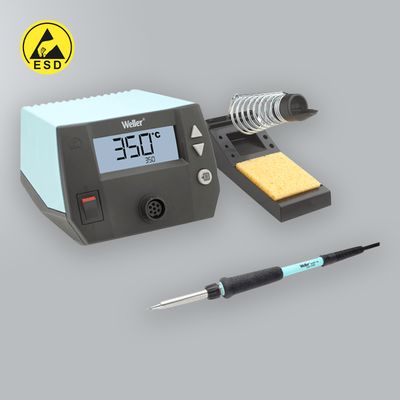
| New & occasional (repairs, hobby, learning the basics) | Temperature control, ESD-safe, a couple of tips, simple | A Weller WE entry station (e.g. WE 1010) |
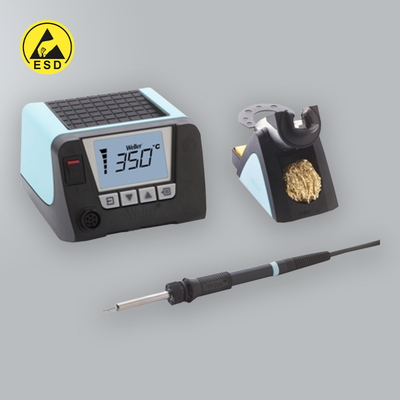
| Learning seriously (a course, or you plan to do a lot) | A bit more tip range and room to grow | Start on the WE 1010, step up to the WT range when ready |
| On a tight budget | At the very least, a temperature-controlled iron — never an uncontrolled one | Entry Weller WE — or call us and we'll help |
Everything that comes in the WE 1010 SET:
- 1-Channel Power Unit, digital, 70 W
- WEP 70 Soldering Iron
- PH 70 Soldering Stand
- ETA Soldering Tip
- TC205 Cleaning Sponge
A complete, ready-to-use station — you only need to add consumables.
See it in action — how to navigate the WE 1010
Want a couple of extra tip shapes for different jobs? Our Tip Finder shows exactly which tips fit the WE 1010's WEP 70 iron.
4.A strong alternative — the Quick 90W
Weller isn't the only good option. Our alternative entry station is the Quick 90W TS2200D Intelligent — a little more power (90 W vs 70 W), a bright LCD display (switchable °C/°F), a tip-temperature sensor for accuracy and three handy presets. It's ESD-safe and lead-free ready, and uses the Quick Series 200 tip range. If you'd like a bit more headroom and on-screen presets for roughly the same money, it's well worth a look — capable enough for a pro bench, simple enough to learn on.
Weller WE 1010 vs Quick TS2200D 90W — at a glance:
| Weller WE 1010 SET | Quick TS2200D 90W SET | |
|---|---|---|
| Power | 70 W | 90 W |
| Temperature control | Digital, closed-loop, single channel | Digital with tip-temperature sensor + 3 presets |
| Display | Digital readout | LCD, switchable °C/°F |
| ESD-safe | Yes | Yes |
| Lead-free ready | Yes | Yes |
| Tip range | Weller ET tips — widely stocked, industry standard | Quick Series 200 tips |
| Supplied as | Complete set: unit, WEP 70 iron, PH 70 stand, ETA tip, sponge | Complete set: control unit, 90 W iron and stand |
| Price | Very close — see the live prices on each product | |
| Best for | The widest tip support and the most recognised brand — a safe default | A bit more power and on-screen presets for similar money |
Honestly, you can't go wrong with either — pick Weller for the broadest tip ecosystem and brand familiarity, or the Quick for extra power and features at much the same price.
5.Don't forget the rest of the kit
Both of the sets above come complete, so as a beginner you're most of the way there out of the box.
To finish your bench, add the everyday consumables — solder, flux and a tip cleaner (brass wool).
6.Beginner FAQs
What temperature should I solder at?
Around 320–360 °C for leaded solder (a little higher for lead-free). Use the lowest temperature that gives a clean, quick joint.
Leaded or lead-free to learn on?
Leaded flows more easily and is kinder while you're learning; choose lead-free if your work has to be RoHS-compliant.
How do I keep the tip working?
Keep it tinned, wipe it on brass wool (not a dry sponge), and don't run hotter than you need — see our guide on cleaning soldering tips.
Do I need an ESD-safe iron?
For any circuit-board work, yes — static damage is often invisible until the board fails later.
How much should I spend?
Enough for a proper temperature-controlled station. A quality entry station is a buy-once; a cheap uncontrolled iron gets replaced.